‏إظهار الرسائل ذات التسميات subscription. إظهار كافة الرسائل


http://ift.tt/1omOXvM

WordPress Ad Master lets you create popups, sliders, floating buttons, on-page campaigns to engage your visitors and invite them to take action. You can easily show a newsletter subscription form, special offer, contact form, or social sharing buttons customized to your liking with the advanced settings Ad Master plugin introduces.


Choose from a number of professionally designed templates, or create your custom look with a number of easy options. Create a highly engaging experience for your audience, and increase your subscriber base, social presence, and customer interaction with the Ad Master plugin.


LIVE DEMO


Features


Create popup campaigns

Create sliding ad campaigns

Create corner ad campaigns

Show floating button on your site

Show custom exit message when user tries to leave the page

Add on-page campaign

Show rich text, video, or custom image in a campaign

Show an optin form in a campaign (works with ALL major email providers)

Show a contact form in a campaign (message is sent to the email address you specify)

Show social sharing buttons in a campaign

Set Start and End Date for your campaign

Define where your campaign should be displayed on the site

Show your campaign on page load / on page leave

Set Display Delay time for your campaign

Set Auto Close time for your campaign

Enable Content Locking for a campaign

Choose from a number of professional templates

Choose from a number of custom close buttons

Modify any of the advanced design settings

Customize colors

Use Visual Editor for content customization

Show your campaign in a widget

Check statistics for each of your campaigns


Create Campaign


Ad Master plugin lets you create different types of campaigns (popup, sliding ad, corner ad, floating button, on-page, rotating on-page, alert on leave) and add different types of call-to-actions to your campaign (optin subscription form, contact form, button, social sharing buttons).


When creating a campaign, you can manage General Settings, Design Settings, and Content Settings of your campaign. In General settings, you can set Start and End dates for your campaign, display mode, display delay, auto close time, enable content locking.


For Design settings, you can choose from a professionally designed templates, or you can create your custom one. You can modify any setting of your campaign to create a look that suits your website design and campaign goals.


Customize campaign’s content in Content Settings section. Input your headline, text, add bulleted list, customize the form fields and button. You can also show video, or custom image in your campaign.


Once done, save your campaign and it will instantly appear on your site. You can set to show it on all pages of your site, or only in the selected category, post, or page.


Manage Campaigns


You have a number of options to manage your campaigns. You can edit the campaign, and the changes will instantly appear on the site. You can copy the campaign, which is useful when you are creating similar campaigns for different sections of your site. You can pause and further resume the campaign, and you can delete it.


Ad Master plugin provides detailed statistics for each of your campaigns, such as number of views, unique impressions, clicks, and effectiveness rate. You can view detailed information for each of the above parameters.


wordpress, advertising, banner, contact form, email, form, marketing, newsletter, opt-in, optin, pop-up, popup, popups, social, subscription, wordpress popups May 06, 2014 at 04:34PM


http://ift.tt/1iPh1rk


The plugin gives you an ability to collect your visitors email address with this fancy, attention grabber popup window. The signup form simple and fully customizable and you can translate all texts on it. By default you will get a ready subscription form, just you have to fill out with your email address or MailChimp ID.

Provides a quick, professional solution to start building your email list in minutes. Save time, get more clients, get more sales or traffic with your email list.

You can use it with MailChimp, but if you have any other email database manager, you can use it with that as well. In that case, the plugin will send you a message about every subscription with the user’s email address, therefore you can easily add it to your own email list manager. You can also use this function as a signup notification.


Key Features


  • Responsive, Mobile-Friendly

  • Visual Builder with Live Preview on Admin

  • Create Unlimited Signup Forms

  • Display the Signup Form on a Specified Page with Shortcode

  • Custom Text, Title, Subscription Button Text, Email Input Placeholder, Display All of Them on Your Own Language

  • MailChimp Support

  • Lightweight Minified and Obfuscated Javascript, using CSS3 Animations with AJAX Validation

  • Compatible with All Major Browsers

  • Unlimited Color Variations

  • Add HTML to the Content (images, HTML code, etc.)

  • Customizable Animation Time, Auto-Open and Timer Feature

  • Signup Notifications via Email, 9 Different Positions

  • 650+ Font Styles

  • Manage Multiple MailChimp Lists, API Keys

  • Well Detailed Documentation with Quick MailChimp Tutorial


SUPPORT


If you have any question or feedback, please feel free to email via my user page contact form.


Please check out my other items:


Check out the demo pages:


Credits


I owe a big thank you for the following websites:


newsletters, wordpress, email, email list, form, mailchimp, marketing, newsletter, optin, plugin, signup, subscribe, subscription May 02, 2014 at 03:18AM


http://ift.tt/1lebSff

goddess responsive


About Template


Goddess – is a one page website template with a modern design based on Bootstrap 3. Goddess is supported by all modern browsers, including mobile devices. The template has responsive design and graphic optimized for high-resolution screens (retina-ready). The template consists of modules that can be easily deleted, added or exchanged. The distinction of Goddness is the switch button for touch devices. With the help of this button you can activate all the hover effects (which is very convenient for touch devices). The template menu is implemented in the manner of the sidebar menu of the Google Nexus 7 page. Besides Goddess has two variants of the main page with a loopable video: YouTube and Vimeo (+API).

The template has the main slider with a unique design, svg-animation, font Awesome icons, pricing tables, blog with topics, simple portfolio with integrated FancyBox plugin, Google Maps and Google Street View. The template also has two working php-forms with validation (feedback and subscription). Goddess already comes with color schemes.


Features:


  • HTML5, CSS3, jQuery, PHP

  • Bootstrap 3

  • Responsive design

  • SVG animations

  • Font Awesome (template icons)

  • Ready for high-resolution screens (retina-ready)

  • Google map, Google StreetView

  • Working PHP subscription form with validation

  • Working PHP feedback form with validation

  • Cross browser support (+Mobile devices)

  • Premium plugin – FancyBox 2

  • The navigation menu is as seen on the Google Nexus 7 page.

  • Blog with topics

  • Light portfolio

  • Video templates (ideal for desktop browsers)

  • Detailed documentation with FAQ

  • Files are commented

  • 20 color schemes


Note: photos not included in the package.


Template live preview credits


creative, site-templates, blog, bootstrap, contact form, google map, google streetview, html, landing page, modern, one page, portfolio, pricing tables, subscription April 18, 2014 at 06:34PM


http://ift.tt/1n4BKHg

Plugin Home Page

Support Forums

Follow on Twitter

Video on Youtube


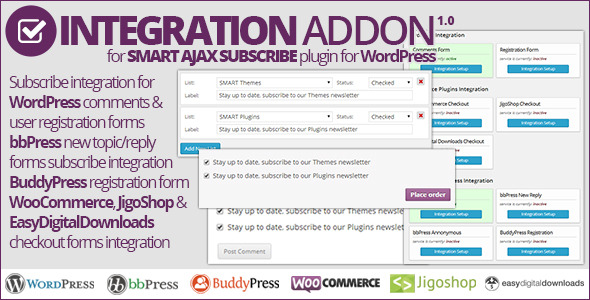
This is NOT standalone plugin, it is an addon for Smart AJAX Subscribe plugin, and this addon can’t be used on it’s own. This addon adds integration with various WordPress and other plugins forms for: Smart AJAX Subscribe and you need to purchase and install this main plugin first. Do not attempt to use this addon on its own, it will not work.


Addon Information


Smart AJAX Subscribe: Integration Addon is easy to use addon for Smart AJAX Subscribe plugin allowing you to add newsletters subscription selections into various forms in WordPress or forms from different popular plugins. Using same, powerful subscriptions capabilities from Smart AJAX Subscribe you can easily offer your users, visitors or customers to subscribe to one or more newsletter subscription lists when leaving comments, opening topics in forums or making a purchase.


Uou can individually control each integration method and assign different forms to each one. You can assign any subscription list from main Smart AJAX Subscribe plugin you have set from MailChimp, MyMail, GetResponse and all other supported newsletters services.


This addon can integrate with these plugins and different forms:


  • WordPress new comment form

  • WordPress standard registration form

  • BuddyPress extended registration form

  • bbPress new topic form

  • bbPress new reply form

  • bbPress anonymous post form

  • WooCommerce checkout

  • JigoShop checkout

  • Easy Digital Downloads checkout


Integration tab to control all integrations


Integration tab to control all integrations

Addon adds extra tab inside the settings panel for Smart AJAX Subscribe where you can see status of all supported plugins (availability and activity), with each form integration.


Assign subscription lists to every integration


Assign subscription lists to every integration

For each integration method you can assign one or more subscription lists with different label and different initial checked state. Also, you can add some custom HTML to be displayed before and after checkboxes list.


Seamless integration into various forms


Seamless integration into various forms

Plugin integrates with different forms seamlessly and you can easily style added checkboxes further if you need to. If you need, plugin can be integrated manually into any other form in WordPress, and more information on that is included in the developers guide PDF in the addon package.


Supported Plugins


  • BuddyPress – 1.6 or newer. Tested with 1.8.1 and 1.9.2.

  • bbPress – 2.2 or newer. Tested with 2.3.2, 2.4.1 and 2.5.3.

  • JigoShop – 1.0 or newer. Tested with 1.7.3 and 1.8.1.

  • WooCommerce – 2.0 or newer. Tested with 2.0.20 and 2.1.6.

  • EasyDigitalDownloads – 1.8 or newer. Tested with 1.9.8.


Addon Requirements


  • WordPress 3.3 or newer

  • Smart AJAX Subscribe 2.5 or newer: get it here


Changelog


Version 1.0 / 2014.04.08.


  • First release


newsletters, wordpress, bbpress, buddypress, comments, easy digital downloads, forms integration, jigoshop, mailchimp, marketing, mymail, newsletter, registration, subscribers, subscription, woocommerce April 09, 2014 at 08:41PM

Cody is a professional, responsive and retina ready HTML5 coming soon template which has been built using the new Twitter Bootstrap3 framework.


Cody comes complete with three home page variations, slideshow, single image and Youtube video. It also has a handy modal box containing a countdown to your launch date and a working subscription form. All images are included in the download, and you can also easily add your own.


I have also included detailed documentation to guide you through the code. I hope that I have covered everything but if there is something that you would like to know then I am happy to help out.


If you decide to purchase this template, please rate it. Many thanks!


Features

  • Internet Explorer 9+, Firefox, Safari, Opera, Chrome

  • Bootstrap3

  • Well Documented Code and Css

  • Html5 & Css3 Styling

  • Responsive Design

  • Retina Ready

  • Css3 Animations

  • Three Homes Page Styles including:

  • – Slideshow
    – Single Image
    – YouTube Video


  • All Images Included

  • 369 Retina Icons

  • Countdown Counter

  • Working Ajax Subscription Form

  • Google Font Replacement


More